android hacking

Android and Arduino RF Outlet Selector - Hacking

Cyber Monday may be behind us, but there are always some hackable, inexpensive electronics to be had. [Stephen's] wireless Android/Arduino outlet hack may be the perfect holiday project on the cheap, especially considering you can once again snag the right remote controlled outlets from Home Depot. This project is similar to other remote control outlet builds we’ve seen here, but for around $6 per outlet: a tough price to beat.
[Stephen] Frankenstein’d an inexpensive RF device from Amazon into his build, hooking the Arduino up to the 4 pins on the transmitter. The first step was to reverse engineer the communication for the outlet, which was accomplished through some down and dirty Arduino logic analyzing. The final circuit included a standard Arduino Ethernet shield, which [Stephen] hooked up to his router and configured to run as a web server. Most of the code was borrowed from the RC-Switch outlet project, but the protocols from that build are based on US standards and did not quite fit [Stephen's] needs, so he turned to a similar Instructables project to work out the finer details.
Stick around after the break for a quick video demonstration, then check out another wireless outlet hack for inspiration.

Read more at: http://hackaday.com/2013/12/06/android-and-arduino-rf-outlet-selector/

Your mouse - A terrible webcam for hacking

Your optical mouse contains Camera!

It should come as no surprise your optical mouse contains a very tiny, very low resolution camera. [Franci] decided to take apart one of his old mice and turn that tiny optical sensor into a webcam.
Inside [Franci]‘s Logitech RX 250 is an ADNS-5020 optical sensor. This three wire SPI device stuffed into an 8-pin package is a 15×15 pixel grayscale image sensor. [Franci] started this project by bringing out the Arduino and Ethernet shield. After soldering a pull-up resistor to the image sensor’s reset pin, connecting the rest of the circuit was as simple as soldering a few wires to the Arduino.
The Arduino sketch sends the image data for each pixel to a computer over a serial connection. A bit of javascript and a touch of HTML takes this pixel data and turns it into a webpage with a live view of whatever is directly under [Franci]‘s mouse.

Read More at: http://hackaday.com/2014/01/14/your-mouse-is-a-terrible-webcam/

Android+Arduino HACKING through Face Following RC Car

To some of us, hacking an RC Car to simply follow a black line or avoid obstacles is too easy, and we’re sure [Shazin] would agree with that, since he created an RC Car that follows your face!
The first step to this project was to take control of the RC Car, but instead of hijacking the transmitter, [Shazin] decided to control the car directly. This isn’t any high-end RC Car though, so forget about PWM control. Instead, a single IC (RX-2) was found to handle both the RF Receiver and H-Bridges. After a bit of probing, the 4 control lines (forward/back and left/right) were identified and connected to an Arduino.
[Shazin] paired the Arduino with a USB Host Shield and connected it up with his Android phone through the ADB (Android Debug Bridge). He then made some modifications to the OpenCV Android Face Detection app to send commands to the Arduino based on ‘where’ the Face is detected; if the face is in the right half of the screen, turn right, if not, turn left and go forward.
This is a really interesting project with a lot of potential; we’re just hoping [Shazin] doesn’t have any evil plans for this device like strapping it to a Tank Drone that locks on to targets!

Source: http://hackaday.com/2014/01/15/androidarduino-face-following-rc-car/

LED sexting belt buckle


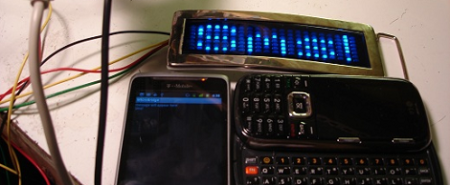
For some ungodly reason, [Scott] has a friend that wanted a ‘sexting themed’ Halloween costume. We won’t try to make any presumptions of the creativity or mental stability of [Scott]‘s friend, but the SMS scrolling LED belt buckle he came up with is pretty cool.
The belt is based around a $13 scrolling LED belt buckle [Scott] found online. There was a problem with the belt buckle, though. Thirteen dollars means [Scott] didn’t get a whole lot of features with his buckle, so there are only 3 buttons on the entire device: letter up, letter down, and enter. Instead of pressing a button 80 times to get a lowercase ‘z,’ an Arduino was thrown into the mix to take care of all the button pressing.
The Arduino sketch could now input any message into the belt buckle in a matter of seconds. All that was left to do is taking care of the SMS to text part of the build. For this, [Scott] used the Sparkfun USB Host Shield and a custom Android app. Whenever an SMS is received on the phone, the message is sent through the USB shield to the Arduino and output on the belt buckle.
We won’t make any assumptions about the content of the messages during the Halloween party, but at least the video demo of the build is family friendly. Check it out after the break.

Bluetooth for Android open accessories


[Ytai], the lead developer for the IOIO breakout board for the Android Open Accessory kit, figured out how to control just about anything from an Android phone wirelessly over Bluetooth.
When [Ytai] first announced the IOIO breakout board for Android devices, one of the commentors on his post said a standard Bluetooth dongle could stand in for the USB cable between the phone and the IOIO. Wireless control of home automation project and robots was just too good of an idea to let go, so [Ytai] dove into this new Bluetooth project.
After getting a cheap Bluetooth dongle from DealExtreme, [Ytai] found btstack, a lightweight Bluetooth stack that was perfect for an embedded environment. Dealing with the USB driver for a no-name Bluetooth adapter didn’t come as easily, but after a few long nights, [Ytai] emerged victorious.
He still has a few more problems to overcome. Namely, supporting environments where more than IOIO board is available. [Ytai] is thinking about adding support for WiFi dongles, something we’d love to see. Check out [Ytai]‘s demo of wireless control of a servo after the break.

IOIO Over Bluetooth Demo

Al Linke interviewed at Android Open 2011


Bluetooth enabled breathalyzer


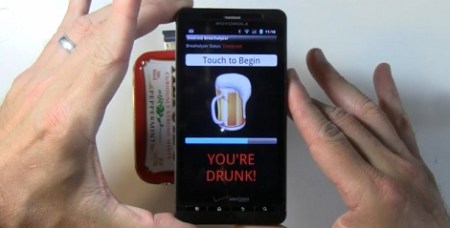
[Al] at Open Gadgets just put the finishing touches on his Android breathalyzer. It’s the perfect thing to install on ex-girlfriends’ phones to prevent 2 a.m. drunk dialing.
The project started off as a talking breathalyzer connected to a computer that tweeted your BAC, gave weather and stock readouts, and functioned as a photo booth. Since the first reveal of his project, [Al] moved from the desktop world to the mobile domain.
The breathalyzer itself is contained entirely in an Altoids tin. The build is based on the IOIO board that recently got support for Bluetooth. An alcohol sensor in the project measures the alcohol content of the surrounding atmosphere and reports this back to a phone over Bluetooth. There’s no word if the Android version of [Al]‘s breathalyzer has the Twitter and photo booth functions, they would be relatively easy to add.
While a wirelesss, tweeting breathalyzer lends itself to a competition for a high score, [Al]‘s project could have a few very good implantation; a DIY auto ignition interlock would be a very useful device for some people. Check out the videos of [Al]‘s builds after the break.

I am root Kindle Fire edition


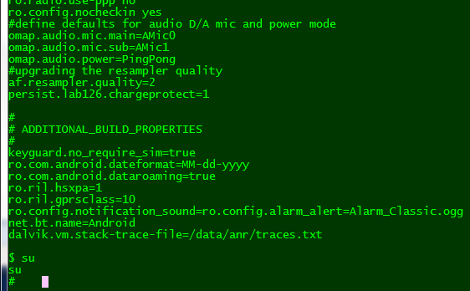
Amazon’s new tablet reader, the Kindle Fire has been rooted. Early this morning [Death2All110] posted the steps he took to gain root access to his device (which is so fresh out of the box it still smells new). The heavy lifting is done by a package called SuperOneClick which aims to root all manner of phones and devices running Android.
There’s a bit more than the one click necessary, but not by much. Using the Android Developer Bridge in conjunction with the SDK you need to put in a value that will be recognized as the VID. From there, turn on the ability to install apps from unknown developers, re-enumerate the device on your PC and run the one-click package.
What can you do with this? Well, it completely opens up the Android OS so that you can bend it to your will. We haven’t seen any demonstrations yet, but it should be even better than what we saw done with the Sony PRS-T1.

Kitchen Hacks: an Android bartender


[Nick] just finished up bis barbot build that is named after our favorite bartender. It’s an impressively capable even if it was done on the cheap.
The user chooses a libation for iZac to make via an Android tablet. This drink is interpreted by an Android ADK to have the mechanics of the robot swing into action and start making a drink.
The part of the build that moves the fluid was inspired by the Evil Mad Scientist Labs’ Drink Making Unit 2.0. Instead of pumps pulling the liquid through tubing, [Nick] attached an aquarium air pump to an Erlenmeyer flask. A siphon tube draws liquid out of the flask because of the difference in air pressure. The liquid is controlled by a few laser cut pinch valves that he designed.
Once a user selects a cocktail, the robot swings into action and dispenses liquid into a glass sitting on a load cell. Since the glass is being weighed at all times, iZac knows exactly how much alcohol (and in what proportion) is in the cocktail. [Nick] tested out iZac at the Sydney Hackerspace with soda water and flavoring. iZac proved very popular and we’re wondering if we could build something like this in a liquor cabinet.

Syneseizure makes objects feel loud


Synesthesia is a mix-up in the wiring of the brain where sensory inputs are perceived differently than what ‘normal people’ usually experience. People with synesthesia can have visual input mapped to aural perception in the mind, or driving along a highway where there’s a recent skunk roadkill can smell ‘loud.’ It’s an interesting way of perceiving the world that’s usually inaccessible to most of the population, but the Syneseizure tries to replicate this way of viewing the world.
There’s a bunch of types of synesthesia (Led Zeppelin feels purple, or apples smelling further away than grapes), but [Greg] and his team needed to choose one subtype to reduce the complexity of their project. They chose mapping visual input to touch sensation. This was accomplished by attaching a dozen speakers to the test subject’s face. A webcam recorded where the subject was looking at and with a Processing sketch, the webcam was reduced to a grayscale 4×3 pixel grid. The intensity of the each pixel corresponded to the strength of buzzing in each speaker. All that was left to do is put a mask over the subject and have them walk around.
The Syneseizure was built for Science Hack Day San Francisco and ended up winning the people’s choice award. There’s a bunch of pics and a great write-up on the project website, so be sure to check that out.

Arduino Google Voice Activated Servo Motor Controlling using Android

An exercise in servo voice control with Android

voice-controlled-android-lock
[Shazin] had some free time on his hands, so he settled in to do something he had been meaning to for a while – learn Android programming. He went an indirect route, and ended up using the Scripting Layer for Android (SL4A), which gave him a head start on the process. Sitting in between the Android API and scripting languages such as Python, SL4A allowed him the ability to apply something he was already familiar with to the Android environment.
He thought it would be cool to try building a door entry system which relied on voice commands to lock and unlock. Using the Google Voice API for Android and an Arduino, he built a small Python application that allows him to toggle a servo simply by talking into his phone.
The application on his phone communicates with an Arduino over WiFi, once Google Voice has decoded the command [Shazin] is giving. The Arduino controls a servo, which in theory could control the locking mechanism on a door.
After a bit of tweaking and some added security, his proof of concept could definitely come in handy.
Check out the short video below to see [Shazin’s] voice-controlled servo in action.

USB Stick Contains Dual-Core Computer, Turns Any Screen Into an Android Station


The dongle makes any screen an Android device


Want that 70″ LCD television in your living room to be an Android device? This little guy can make it happen. With an HDMI port on one end, and a USB plug on the other for power, just plug in FXI Technologies’ Cotton Candy dongle to create a 1080p Android television.
The price isn’t set for the device, but it’s expected to be available at less than $200. Considering what’s inside that’s pretty reasonable. There’s a dual-core 1.2 GHz ARM processor, 1 gig of RAM, 64 gigs of storage, Bluetooth, WiFi, and a microSD card slot. Wow!
So is it hackable? Absolutely. Well, kind of? The company doesn’t intend to bring Cotton Candy to the retail market. Instead, they will sell the device to developers who may do what they wish. From there, said developers have the option to license the technology for their own products. This begs the question, will the development kit come in under $200? Hard to say.
Check out the video after the break to hear an interview with the company’s CEO. It certainly sounds fascinating, and like the Chumby NeTV, we can’t wait to see what comes of this.

Google ADK clones pack a few extra features, hopefully far cheaper than the original

adk_board_clone
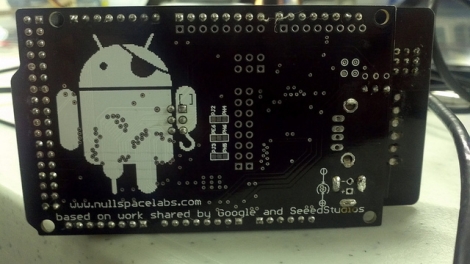
[charliex] from Null Space Labs wrote in to share a project that he and the rest of the gang have been working on over the last few weeks. The team has been remixing and building clones of the Google ADK demo board we saw earlier this year, in hopes of getting a huge batch prepped before Defcon 19.
Their version makes subtle changes to the original, such as extra header rows for Mega AVRs, higher quality RGB LEDs, and a nifty pirate-Android logo. They also added the ability for the board to send and receive IR signals allowing it to be used as a TV-B-Gone, as well as in more fruitful pursuits. The Arduino board used with the ADK has only undergone minor revisions, most of which were layout related.
[charliex] hasn’t mentioned a price for their improved ADK boards, but we’re guessing they will be substantially cheaper than the official Google version. In the meantime, check out their site for a boatload of pictures and videos of these boards undergoing various stages of construction.

how to hack a android

[Joe] was experimenting with his Arduino when he started thinking about how he could get it to communicate wirelessly with his Android phone. Bluetooth is an option, but it requires some extra components, and Google’s ADK works as well – just not wirelessly.

Instead, he thought it would be neat to see if he could

connecting it to the Arduino via a resistor and diode. Using the Android Tricorder app, he was able to locate his phone’s magnetometer, after which he ran some tests to narrow down the best sample rate and frequency range for communications.

To transfer data between the two devices, he had to bit bang the signal in software, since the Arduino’s UART has a lower limit far faster than the 7 bps data rate he was able to achieve with the magnetometer.

While his wireless Arduino to Android bridge isn’t likely to win any awards for throughput, it is a great proof of concept project. Be sure to check out the video below to see his “poor man’s NFC” in action.

Back to Top